4) Understanding Flowcharts Further
If you were able to do all flowcharts, then congrats! I did say to ignore the shape, but that was only for understanding the arrows and the way a flowchart works. So, now we’ll get into what those Shapes are. But first you need to know about computers and how they actually work, and pay attention, because if this is new information to you, then it’s the foundation for pretty much all programs.
Let’s begin!
Understanding Programs
The thing is, a Computer is an entire system that is made of multiple pieces coming together and working with each other so that everything works the way it’s supposed to. Programming, and making Programs, are just ways of using specific languages to talk to those pieces and make them do simple things.
The two things to know about are Inputs and Outputs. This is how you interact with computers, and this is how programs will work.
Inputs
An Input means giving information to the computer. This includes things like the Keyboard, the Mouse, the Phone Touchscreen, the Microphone, things like that. Inputs are done through devices that you use. That you interact with, and the computer uses that information. Taking a picture is an input because the computer is reading the real world colours and lighting through the camera. Keyboards are inputs because you’re pressing specific buttons and the computer is reading what buttons you press. Using a mouse is an input because your movements are what move the pointing thing on screen (I learnt later that the pointing thing is called a cursor).
Why is this important to programming?
Well, remember how way back I told you to give me three numbers and also tell me what to do with them so I can tell you which number out of them is the highest? That’s where input comes in. How do you give me the three numbers? Through INPUTS. I (the computer) wouldn’t know which numbers you want me to use, so you have to INPUT the numbers.
It’s exactly how in a calculator if you’re doing something, you have to press buttons so it knows which numbers you want to use. An input is just, some form of external data being given to the computer.
Outputs
An Output is the result the computer gives you. This includes things like the Speakers, the Headphones, the Screen, the result when you press the Equals sign on the Calculator. When you’re reading this text on screen, what you’re actually reading is an Output of specific colours and shapes on a surface with some light. When you hear sounds via speakers or headphones, you’re experiencing the data the computer is calculating and giving out.
Why is this important to programming?
Because an Output has to be calculated. The computer has to calculate the output based on the data it has. That data can also include input values. It can also work without them, but in most programs, it worked with them.
The Output is the RESULT of the program. It’s what you want to see. The thing is, if you press the Equals sign on a calculator and give it the correct numbers, you also want to see the result. The output is first calculating that result, then showing it to you.
That last step is important because, if the number is calculated but you’re not shown what it is, then the program is useless to you. Outputs are necessary for you to get what you want. You can move around and play a game but if you’re not able to actually see what’s happening, even if the game is running completely fine, then it’s useless to you.
I/O in Flowcharts and Programs
I/O means Input-Output. They usually go hand in hand. Now, the way these two would work together in a program is, you’d input it, and the computer would give you an output. You press the Spacebar in a game, you’d see that the character jumps. The spacebar is the input, and the jump, and also you seeing it on the screen, is the Output.
You have to actually Input the values yourself. And then the program will give the output.
For the Highest Number problem, you have to input the numbers. It’s not always going to be 14, 19, and 25. What if you want to choose a different number? Then you’d input different values.
Now here’s how the Inputs actually work. See, all of that above was just explaining what Inputs and Outputs actually are. All of that was background knowledge for the next part:
The computer is dumb. It only remembers specific things. All of those files in Hard Drives and also loaded in RAM, that’s all there is. If you remove those parts then it would remember absolutely nothing. There’s a reason it’s called Memory. And if something is not in memory, then it will forget it instantly. If you tell the numbers but the computer doesn’t store them in memory, the computer immediately forgets them, like they were never even there. The memory capacity of the computer is very limited, so it makes efforts to forget things unless it has been told to actually remember it. That’s why Saving your work in Microsoft Word or Excel or Photoshop is so important. If you don’t Save it, it will forget and be lost forever.
So what if you actually want the computer to remember the numbers you tell it, so it can use them for calculation? You tell the computer to actually store it into the memory. And how do you do that? You do it the same way Maths does it.
You do it with VARIABLES.
Variables hold values. Going back to the Highest Number example, you want me to remember the values 14, 19, and 25. So, you’d tell me to keep Variables to store those values. a = 14, b = 19, c = 25. Then I’d be able to do the comparison without forgetting. If a is greater than b and a is also greater than c, then I’d tell you that a is the highest value. If b is greater than a and b is greater than c, then b is the highest value. If c is greater than a and c is greater than b, then c is the highest value.
Variables will allow the computer to actually remember the values so it doesn’t forget immediately, and any input you do HAS to be stored in a variable, otherwise the computer will forget it.
You’ll learn specific Variables later, in 7) Inputs, Data Types, and Assigning. But for now, just keeping variables in mind, let’s re-learn Flowcharts.
Flowchart Specifics
So going back to the example of Flowcharts, look at the specific shapes I used in the Highest Number problem.
The Start and End are Circles
Inputs and Outputs are Parallelograms
Places where the Program has to go one way or another (we call these Conditionals) are Diamonds
The only missing shape is the Rectangle, which is just used as a General Step. But here’s an example of a more detailed program, and you can see that Rectangles get used far more frequently.
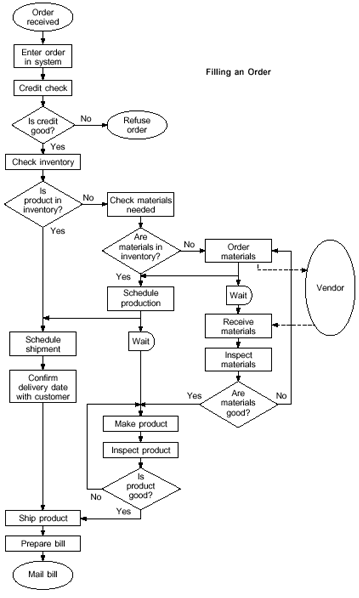
(Table taken from Asq.org).
Although this table doesn’t have an Input in it, that was on purpose, because a Program can run completely without an Input. It’s just that an Input is necessary to have if you want your machine to give a different answer depending on a different situation. If a calculator will always tell you that 10+10 is 20, then sure, it does that job completely fine, but if you want to have different numbers, like 5+2 or 12+15 or anything else you can think of, you’d have to make sure the Calculator can accept an Input so it can actually do those tasks. The same goes for Rock Paper Scissors. If you (the human) are choosing a choice between Rock, Paper, and Scissors, then the computer needs to remember it so it can actually play the game. Otherwise it’s the equivalent of you playing Rock Paper Scissors with someone and they have no idea if they won, lost, or tied, because they immediately forgot what you actually chose. The purpose of the Input is to give an appropriate Output based on different choices, and the purpose of Variables is to remember inputs.
Practice Exercises
The Flowcharts you made from the previous page, turn them into more proper flowcharts with appropriate shapes. Should be easy!
Answers are on answers.